Table of Contents Pro
This component is Part of the Essential Components plugin. Browse and insert 30+ components directly in Framer. Start for free
Table of Contents Pro makes it easy to add a clean, customizable Table of Contents to your pages. It automatically scans your connected Formatted Text field, detects all H1–H4 headings, and builds a clickable TOC that smoothly scrolls to each section. Perfect for blogs, articles, documentation, or long-form landing pages.
Features
🧭 Auto Detection: Finds all H1–H4 headings in your content without extra setup.
⚡ Smooth Scrolling: Clicking a heading scrolls directly to the right section.
🎨 Fully Customizable: Control layout, fonts, colors, spacing, and styles in the Framer UI.
🧱 Lightweight: Automatically updates as your CMS content changes.
🧩 Works with CMS: Ideal for dynamic content and blog templates.
You can customise all the properties i.e padding, Background, scroll behaviour ,e.t.c
How to Use
In your CMS collection, make sure your content is stored in a Formatted Text field.
Add a Framer Text element to your page and connect it to that CMS field.
Drag and drop the Table of Contents Pro component onto the same page.
The component will automatically detect your H1–H4 headings and display them as a clickable list.
Use the right-hand controls to adjust layout (padding, radius, indent), colors (default, hover, active), and fonts for each heading level.
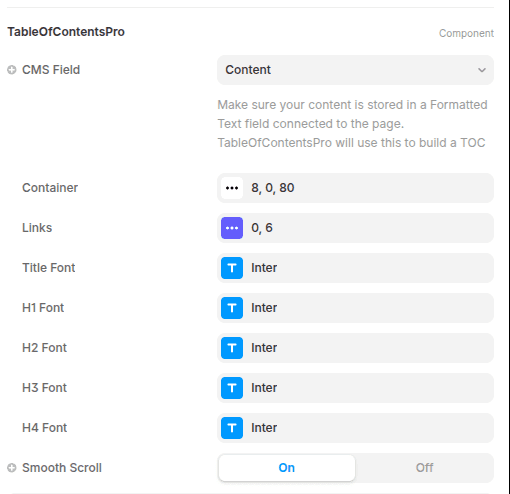
Adjust the Scroll Offset if you’re using sticky navigation, so the target heading isn’t hidden behind it.
Preview or publish your page — the TOC will update automatically when your content changes.